

Learn how to plan your website structure using AI or manual workflows in Siteplay.ai.
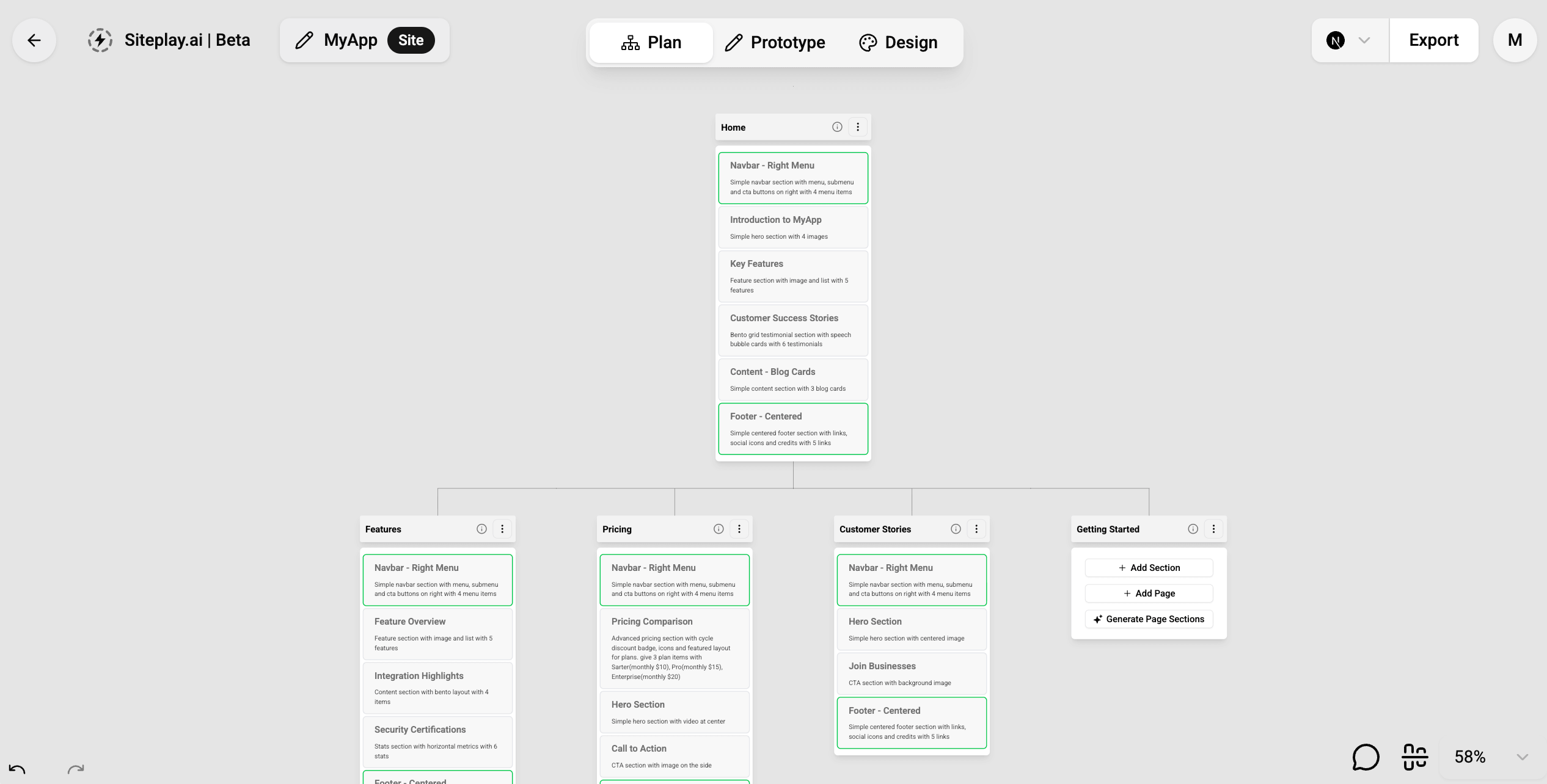
The planning workflow in Siteplay.ai helps you create the foundation of your website before moving into prototyping or design.
A well-structured website plan helps you:
- Organize pages clearly
- Define page hierarchy
- Plan section layouts
- Improve user navigation
- Speed up the design process
- Generate better AI results
Siteplay.ai provides two ways to plan your website:
- Planning With AI
- Planning Manually
We recommend you to take hybrid approch to have more control on the sitemap creation.
Planning With AI
Section titled “Planning With AI”The fastest way to create a website structure is by using AI.
You can simply enter a prompt describing your website idea, business, or product, and Siteplay.ai will automatically generate a sitemap with pages and sections.
Generating Pages
Section titled “Generating Pages”For example:
Create a SaaS website for an AI meeting summarizer withpricing, blog, integrations, and Contact pages.Using this prompt, Siteplay.ai can instantly generate below pages:
- Homepage
- Pricing page
- Blog pages
- Contact page
- Additional supporting pages
The AI planning workflow automatically creates a complete website sitemap based on your prompt.
This helps you avoid manually thinking about:
- Which pages to create
- How pages should be organized
- What content should appear on each page
- Common website structures for your niche
The generated sitemap acts as the blueprint for your website.
Generating Sections
Section titled “Generating Sections”After generating pages, Siteplay.ai can also generate sections for each page automatically.
For example, a homepage may include:
- Hero section
- Features section
- Testimonials
- FAQ
- Pricing preview
- CTA section
- Footer
A pricing page may include:
- Pricing cards
- Feature comparison
- FAQ
- Enterprise CTA
This allows you to quickly scaffold complete pages without manually building every section from scratch.
Why Use AI Planning?
Section titled “Why Use AI Planning?”AI planning is useful when you want to:
- Build websites quickly
- Generate initial ideas
- Create MVP websites
- Speed up client work
- Explore multiple website structures
- Reduce repetitive planning tasks
It is especially helpful for startups, freelancers, and developers who want a faster workflow.
Planning Manually
Section titled “Planning Manually”If you want more control over your website structure, Siteplay.ai also supports manual planning workflows.
You can manually:
- Add pages
- Rename pages
- Organize sitemap hierarchy by drag and drop pages
- Add sections
- Remove sections
- Reorder sections by drag and drop
- Customize layouts
This workflow gives you full flexibility over how your website is structured.
Adding Pages
Section titled “Adding Pages”You can create pages one-by-one based on your project requirements.
For example:
- Home
- Features
- Pricing
- Blog
- Careers
- Documentation
- Contact
This approach is useful when you already have a clear sitemap in mind or need precise control over navigation structure.
Adding Sections
Section titled “Adding Sections”You can also manually add sections to each page.
Siteplay.ai provides reusable sections that can be mixed and matched across pages.
Examples include:
- Hero sections
- Feature grids
- Stats sections
- Testimonials
- FAQs
- Pricing tables
- CTAs
- Footers
Sections can be reordered and customized at any time.
AI + Manual Workflow
Section titled “AI + Manual Workflow”Most users combine both workflows together. We recommend this approach for all our users.
A common workflow is:
- Generate sitemap with AI
- Generate sections with AI
- Manually refine pages
- Customize sections
- Reorder layouts
- Continue into prototype and design workflows
This hybrid approach gives you the speed of AI with the flexibility of manual control.
Whether you prefer:
- AI-powered sitemap generation
- Manual page organization
- AI-generated sections
- Fully custom page structures
Siteplay.ai gives you the flexibility to plan websites your way before moving into prototype and design phases.